 Elite Hub
Router Placement Guide: Where to Put Your Router for the Best Signal
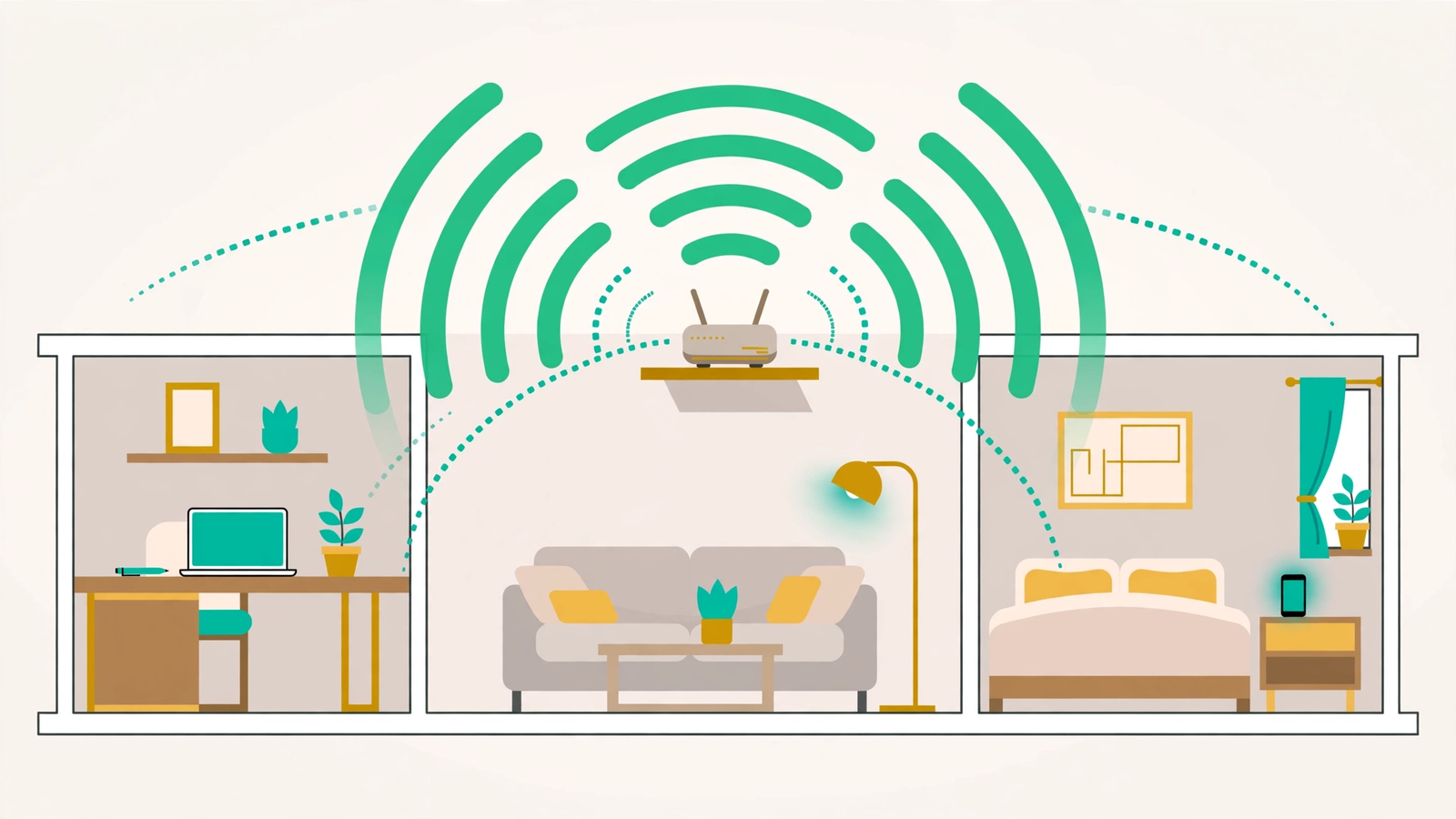
The best router placement for WiFi coverage is the center of your home, about chest to head height, out in the open with clear space around it. WiFi radiates outward and slightly downward from the antennas, so a central, elevated, unobstructed spot gives every room the strongest possible signal — and moving a badly placed router is the single biggest free speed fix most homes have.
How does WiFi actually travel through a house?
Think of your router as a light bulb. It shines signal in all directions, but walls, floors, and objects cast shadows. A single drywall wall barely dims the signal; brick, concrete, metal, and water absorb it heavily. That is why a router tucked behind the TV in a corner room leaves the far bedroom in the dark, while the same router on a hallway shelf lights up the whole house.
Height matters too. WiFi spreads slightly downward from the antennas, so a router on the floor wastes half its signal on the ground beneath it. On a shelf at waist height or above, the signal reaches across rooms and down hallways instead. The best router placement for WiFi coverage is never the floor, never a closed cabinet, and never the far corner of the house.
What are the three rules of good router placement?
Every good spot follows the same three rules — central, high, open. Get all three right and you have done most of the work.
- Central. Put the router as close to the middle of your home as you can, so the distance to the farthest room is as short as possible. In a two-story home, the middle of the ground floor near the stairs works well — signal travels up through a wooden floor far better than sideways through two brick walls.
- High. A shelf, the top of a bookcase, or a wall mount at chest to head height. Never the floor, never the bottom shelf of a cabinet.
- Open. Antennas need clear air around them. Keep at least a hand's width of space on every side and nothing stacked on top of the router. If your router has adjustable antennas, point one straight up and one at a 45-degree angle — that covers both same-floor rooms and the floor above.
Where should the router go in each type of home?
There is no single perfect room — the right spot depends on your floor plan. Use this table as a starting point, then fine-tune with the test above.
| Home type | Best starting spot | Why it works |
|---|---|---|
| Small apartment | Open shelf in the living room, near the center | One router easily covers the whole flat from a central spot |
| Two-story house | Ground floor, near the stairs, on a high shelf | Signal rises through the floor to the bedrooms above |
| Long, narrow house | Middle room or hallway, not either end | Halves the distance to both ends instead of doubling it |
| Home office priority | Same room as the desk, if it is near-central | Your work calls get the strongest signal; other rooms still get enough |
| Thick-walled / concrete home | Central room with the fewest walls to each bedroom | Every wall costs signal — fewer walls between router and devices matters most |
One practical snag: the modem or fiber box usually sits where the cable enters the house, which is rarely central. The fix is a long Ethernet cable — run it from the modem to the router's new central spot. Ethernet cables are cheap, they carry the full speed with zero loss, and one cable is all it takes to put the router where it belongs instead of where the wall socket happens to be.
What should you never put near your router?
Some objects actively fight your WiFi. Keep the router away from all of these:
- Microwaves, baby monitors, and Bluetooth speakers — they transmit on or near the 2.4 GHz band and drown out your signal when in use. Keep at least a meter of distance.
- Metal objects and mirrors — filing cabinets, metal shelving, radiators, and large mirrors reflect WiFi instead of letting it through.
- Fish tanks and water features — water absorbs WiFi signals surprisingly well. A big aquarium between the router and your desk is a real problem.
- Thick walls and appliances — don't hide the router behind the fridge, inside a TV cabinet, or behind a brick fireplace. Open air beats hidden every time.
- Other routers and electronics — a tangle of power bricks and devices right next to the router creates electrical noise. Give it breathing room.
How do I test whether my placement is working?
Guessing is not a method. Use this two-minute test whenever you move the router:
- Stand next to the router and run our free speed test. This is your best-case number.
- Walk to the room where the signal feels weakest and run the test again.
- Compare. If the far room gets at least 60–70% of the near-router speed, your placement is good. Below 50%, keep adjusting — try a higher shelf, a more central room, or fewer walls in the path.
- Repeat the test at the same time of day when comparing spots, so peak-hour congestion doesn't skew the result.
"A router is a light bulb, not a laser — put it in the middle of the room and let the signal reach everywhere."
Test your new spot right now
Move the router, then run our free speed test in your worst room to see the difference.
⚡ Test Your Speed FreeWhat if the signal is still weak after moving it?
Sometimes placement alone isn't enough — usually because the home is large, the walls are thick, or the router itself is old. Work through these in order:
- Switch bands. Use 5 GHz near the router for speed and 2.4 GHz in far rooms for range — the longer-range band often survives walls better.
- Add a mesh system. In homes over two floors or with concrete walls, one router can't cover everything. A mesh system places a second access point where the signal fades, instead of an extender repeating an already-weak signal.
- Check the router's age. A router older than four or five years may simply lack the power and antennas of a modern one. If a wired test at the modem is fast but WiFi is slow everywhere even after moving the router, the hardware is the bottleneck.
- Run an Ethernet cable to the worst room. For a desk PC, console, or TV, a cable beats any WiFi fix — and it frees wireless capacity for everything else.
The best router placement for WiFi coverage is free, takes ten minutes, and fixes more slow-WiFi complaints than any setting or upgrade. Move it central, move it high, keep it open — then measure the difference.
Frequently asked questions
In the center of your home, about chest to head height, out in the open with clear space around it. WiFi spreads outward and slightly downward, so a central, elevated, unobstructed spot covers the most rooms with the strongest signal.
Yes. A router on the floor loses signal to the floor itself and to furniture, and a closed cabinet blocks and reflects the signal. Both can cut speeds in distant rooms by half or more. Move it to an open shelf at waist height or above.
Only if the living room is central in your home. The right spot is decided by the floor plan, not by where the TV sits. If your living room is at one end of the house, the far bedrooms will suffer — run a long Ethernet cable from the modem to a central room instead.
Run a speed test next to the router, then run the same test in the room that feels slow. If the number drops sharply with distance, placement or walls are the problem — not your internet plan. Move the router and re-test to confirm.