 Elite Hub
Mesh WiFi vs WiFi Extender: Which Is Better?
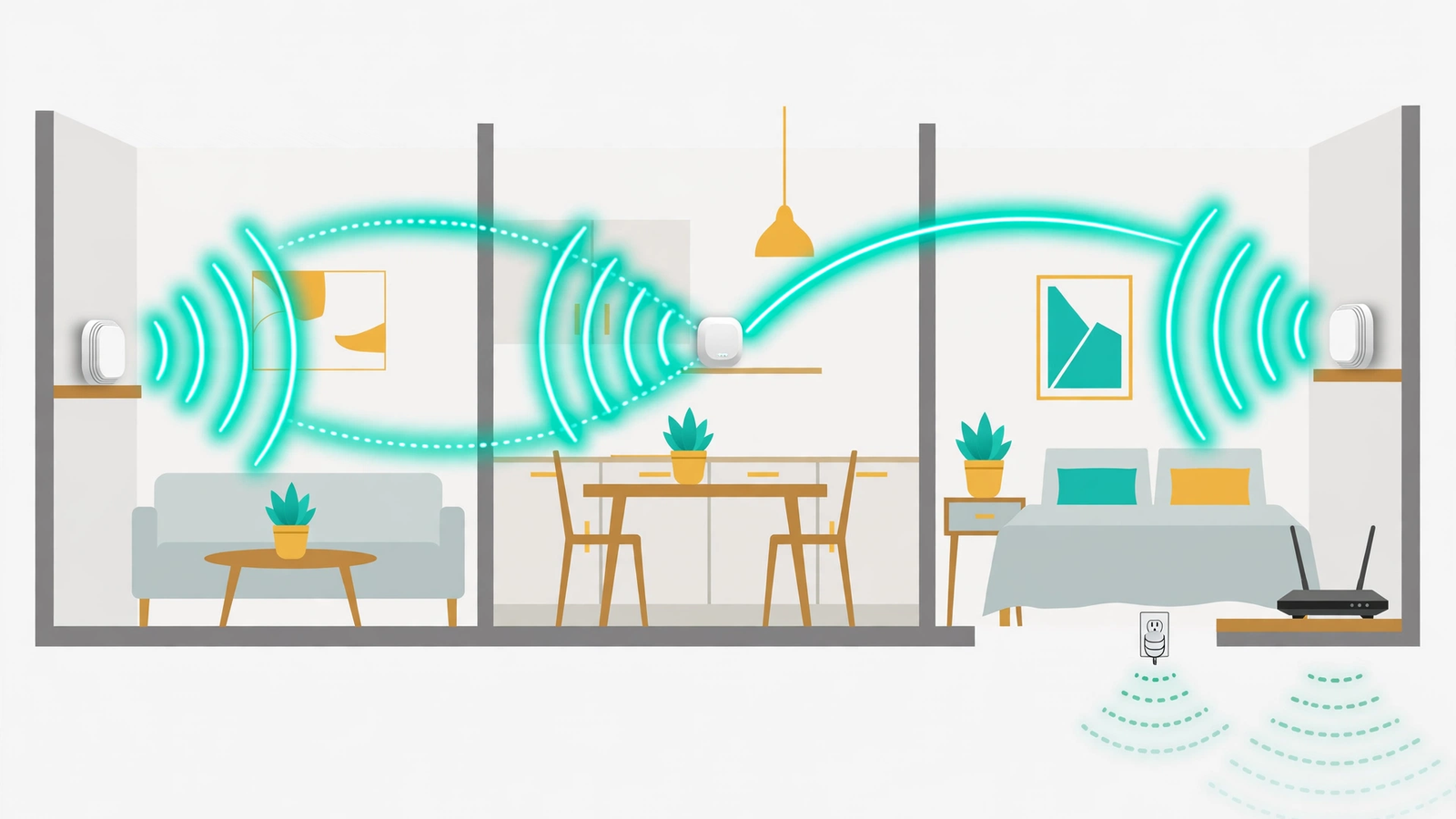
Mesh WiFi vs WiFi extender — which is better? For a large or multi-floor home, mesh WiFi wins: it replaces your router with nodes that form one seamless network. For a single dead room on a tight budget, a WiFi extender is the cheaper fix.
How does a mesh WiFi system work?
A mesh system replaces your router with two or three (sometimes more) identical nodes that talk to each other. One node plugs into your modem; the others sit around the house — one per floor, one near the far bedroom — each passing traffic along to the next. Together they broadcast a single network name, and your phone moves between nodes automatically, without dropping a call or a game.
Because the nodes are designed as a team, they manage themselves: they pick the best path for your traffic, balance the load between nodes, and steer your device to the strongest signal. Setup is usually an app-guided ten-minute job — plug in, scan a code, place the nodes, done. Most systems also update their own firmware and include simple parental controls and guest-network options in the app.
The trade-off is price and a little redundancy: you are buying several radios instead of one. But if your home is big, has thick walls, or spreads over two floors, mesh is the only option that fixes the whole house in one purchase rather than patching one room at a time.
How does a WiFi extender work?
A WiFi extender (also called a repeater) is a small device that plugs into a wall socket halfway between your router and the dead spot. It listens to your router's signal, then re-broadcasts it further into the house. It does not replace your router — it stretches the signal your router already makes.
That simplicity is both its strength and its weakness. An extender is cheap, takes five minutes to set up, and solves one specific problem: the bedroom or garden office where the signal is weak. But it creates a second network name (often your network name plus "_EXT"), and your phone clings to the weaker signal until it drops completely before switching. A basic single-band extender also cuts speed roughly in half, because the same radio receives and re-sends every packet. Dual-band models with a dedicated backhaul lose far less speed — but they cost nearly as much as a budget mesh kit.
Mesh WiFi vs WiFi extender: which is better for your home?
The honest answer to "mesh wifi vs wifi extender which is better" is that it depends on how many dead spots you have. One weak room in a small flat? An extender wins on value — it costs a fraction of a mesh kit and fixes the exact problem. Two or more weak rooms, a second floor, or a home office at the far end of the house? Mesh wins, because it treats the whole home as one network instead of patching holes one by one.
Think of it this way: an extender is a bandage, mesh is a new circulatory system. If you work from home, game online, or have family streaming in three rooms at once, the seamless roaming and even coverage of mesh are worth paying for. If you just want Netflix to work in the back bedroom, the bandage is fine — spend the money you save on a better router position first.
One more consideration: your internet plan. If your connection is 100 Mbps or slower, an extender's speed penalty barely matters — you will still get your full plan speed in most rooms. On a 500 Mbps or gigabit plan, an extender wastes most of what you pay for, while mesh (especially a tri-band system) preserves far more of it.
Mesh vs extender: side-by-side comparison
| Mesh WiFi | WiFi extender | |
|---|---|---|
| Coverage | Whole home, 3,000–6,000+ sq ft | One extra room or zone |
| Network name | One seamless network | Second network (often "…_EXT") |
| Roaming | Automatic, no drops | Manual — devices cling to weak signal |
| Speed loss | Small (10–20% on tri-band) | Up to ~50% on single-band models |
| Setup | App-guided, ~10 minutes | Plug in, press WPS, ~5 minutes |
| Typical cost | $100–$400 for a 2–3 node kit | $20–$80 per unit |
| Best for | Large / multi-floor homes | One dead spot, tight budget |
What does each one cost?
A decent dual-band extender costs $25–$50; a good one with a dedicated backhaul band runs $60–$80. A two-node mesh kit starts around $100–$150 for Wi-Fi 6, and a three-node tri-band system for a large home runs $250–$400. So mesh costs roughly three to five times an extender — but it replaces your router entirely, while an extender only helps if your existing router is already good.
Do the maths before you buy: if your router is five years old, a $150 mesh kit replaces it and fixes coverage in one purchase. If your router is new and only one room is weak, a $30 extender is the smarter spend. And whichever you choose, test your speed before and after with our free speed test — the numbers tell you immediately whether the money worked.
"An extender patches one weak room; mesh rebuilds the whole network — buy the fix that matches the size of the problem."
Test your coverage before you buy
Run our free speed test in every room first — the results show exactly where your Wi-Fi dies, so you buy the right fix instead of guessing.
⚡ Test Your Speed FreeHow to decide in 60 seconds
- Count the dead spots. One room? Extender. Two or more, or a whole floor? Mesh.
- Measure your home. Under ~1,500 sq ft on one floor, a single good router — or an extender — is usually enough. Over that, or across two floors, mesh earns its price.
- Check your router's age. Older than four years? A mesh kit replaces it and upgrades your Wi-Fi standard at the same time.
- Check your plan speed. On 500 Mbps or faster, mesh preserves far more of your speed than a basic extender.
- Try the free fix first. Move your router to a central, elevated spot and re-test. Sometimes the "dead spot" was just bad placement.
The bottom line: for most homes with real coverage problems, mesh WiFi is the better buy — one network, no dead zones, and no fiddling with a second network name. But if the problem is one room and the budget is tight, an extender is a perfectly good answer, and the $100 you save buys a lot of streaming.
Mesh vs extender: how much speed do you actually lose?
The real difference is how much of your plan survives the trip to the far room. A single-band extender has one radio, so it receives a packet and then re-sends it on the same channel; every packet uses the channel twice, which is why throughput roughly halves. Mesh avoids this: tri-band kits give nodes a dedicated backhaul band, and even dual-band mesh nodes coordinate instead of blindly repeating.
On a 500 Mbps plan, a single-band extender in a far bedroom typically delivers 150–250 Mbps — enough for 4K streaming and calls. A mesh node in the same room typically delivers 350–450 Mbps. On gigabit the gap is dramatic, with an extender capping near 300–400 Mbps and tri-band mesh holding 600–800 Mbps. Typical results, not guarantees.
| Your plan speed | Single-band extender (far room) | Mesh node (far room) |
|---|---|---|
| 100 Mbps | ~80–100 Mbps | ~90–100 Mbps |
| 300 Mbps | ~120–180 Mbps | ~220–280 Mbps |
| 500 Mbps | ~150–250 Mbps | ~350–450 Mbps |
| 1 Gbps | ~300–400 Mbps | ~600–800 Mbps (tri-band) |
Which one fits your home? (apartment vs two-storey vs large house)
Flat or apartment (one floor, under ~1,000 sq ft). A single good router usually covers this. If one room is weak, a single extender is the sensible buy and mesh is overkill — spend the money on placement instead.
Two-storey house (~1,500–2,500 sq ft). This is where mesh earns its price: Wi-Fi struggles through floors, so a ground-floor router rarely reaches upstairs bedrooms, and one extender fixes a single room while leaving the others weak. A two-node kit — one downstairs by the modem, one upstairs on the landing — covers both floors under one network name.
Large or multi-floor house (over ~2,500 sq ft, three floors, or a long layout). Buy mesh — three nodes. Two nodes leave a gap at one end or on the third floor, and a third extender creates a chain of repeats that slows everything down. With brick or concrete walls, place nodes closer together, about one per 1,000–1,500 sq ft. Our router placement guide explains how wall materials affect the coverage you get.
Thick walls, garden office, or an awkward layout. Thick walls shrink every device's range, so the fix is more nodes placed closer together. For a garden office, a mesh node in the room nearest the garden gives the best chance; if the signal still dies at the outside wall, a wired connection beats any wireless repeater. If your dead room sits at the edge of 5 GHz, try 2.4 GHz — see our guide on 2.4 GHz vs 5 GHz WiFi.
What does each one cost over 3 years?
Sticker prices hide the real comparison, because the two age differently. A good extender costs $30–$80 and a decent two-node mesh kit $100–$200, so mesh looks three to five times dearer on day one. Over three years the gap narrows: extenders are replaced sooner — built to a lower standard, with few updates, and often unable to keep up with a router or plan upgrade. A mesh kit replaces your router, gets regular updates, and grows one node at a time: moving house means one extra node for $50–$80, not starting over.
| Cost over 3 years | WiFi extender | Mesh WiFi (2-node kit) |
|---|---|---|
| Upfront purchase | $30–$80, one unit | $100–$200, 2-node kit |
| Year 1–2 extras | $0 | $0 |
| Replacement / upgrade | Often replaced within 2 years ($30–$80 again) | Add one node ($50–$80) if needed |
| Typical 3-year total | $60–$160 (buying twice) | $100–$280 (kit + one node at most) |
The honest maths: one room plus a recent router, and the extender stays cheaper; a second extender, or a router that ages out, flips it.
Frequently asked questions
For most homes with more than one dead spot, yes. A mesh system replaces your router with several nodes that form one seamless network, so your devices roam without dropping. An extender just repeats one router's signal and creates a second network name, which is fine for a single weak room but weaker everywhere else.
Often, yes. A basic single-band extender receives and re-sends on the same radio, so it can only do one job at a time and throughput roughly halves. Dual-band extenders with a dedicated backhaul band lose far less, but they cost almost as much as a budget mesh kit.
You can, but it is usually overkill. In a one-bedroom flat, a single well-placed router covers everything, and a mesh kit adds cost and extra hardware for no real gain. Mesh earns its keep in homes over about 1,500 sq ft (140 m²), across two or more floors, or with thick walls.
No. Mesh nodes talk to each other wirelessly by default, which is the whole point — you place them where the signal is needed, not where cables run. If your home has Ethernet wall ports, wiring the nodes together (Ethernet backhaul) gives the fastest, most stable result, but it is optional.
You can, but it is rarely a good idea. An extender from another brand does not join the mesh team — it makes its own network name, so your devices still switch awkwardly, and it repeats a signal a nearby node already covers. If one room stays weak after mesh, buy an extra mesh node from the same system.
Yes, in almost every setup. The main mesh node plugs into your modem and takes over the router's job — addresses, firewall, network name — so your old router comes out entirely. Exceptions: a combined modem-router needs bridge mode, or run the mesh in access-point mode; renters who cannot touch the provider's gateway may find an extender more practical.
Yes — one dead room is exactly the job an extender was made for. If the rest of your home has good coverage, a $30–$50 extender halfway between the router and that room will usually fix it. Check the halfway point still gets a decent signal — at least half your plan speed — and that the dead room reaches 25 Mbps, enough for 4K streaming and calls.